

Most ops leaders reading this already have AI tools sitting somewhere in their stack. The real problem usually isn’t a lack of technology. It’s that most of it isn’t actually running the business yet. Automation in call center environments has quietly become a purchasing exercise more than an operational one for a lot of teams. According to research from AmplifAI, 88% of contact centers use some form of AI, but only 25% have fully integrated automation into daily operations. That gap reframes the whole conversation: the question isn’t should we adopt call center automation, it’s why isn’t the automation we already bought actually working?
This guide breaks call center automation into a maturity model, covers where it delivers real ROI, why so many deployments stall at the adoption stage, and what to actually evaluate in a solutions vendor.
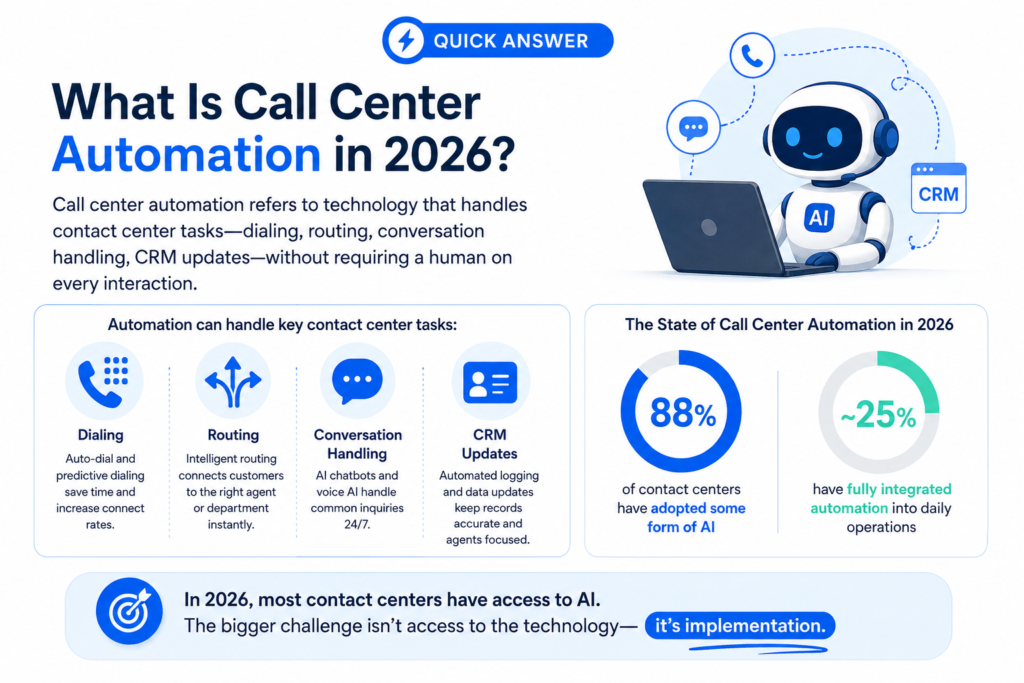
What is Call Center Automation?
Call center automation uses artificial intelligence (AI) and intelligent software to handle repetitive tasks, route inquiries, and streamline workflows across voice, chat, and email. It helps businesses resolve common issues instantly and empowers human agents to focus on complex problems that require empathy and critical thinking.
Automation tools are generally divided into three main areas, each designed to improve the support experience:
- Customer-Facing Automation: Uses AI virtual agents and chatbots to help customers find answers, check status updates, or reset passwords independently.
- Voice Automation: Uses conversational IVR (Interactive Voice Response) and speech recognition to understand why a customer is calling and route them to the right department without pressing multiple buttons.
- Agent-Facing Automation: Supports human staff by providing real-time call transcriptions, suggesting responses, and automatically generating post-call summaries.
Modern automation goes beyond simple scripted menus. It connects directly with your back-end business systems (like your CRM) to securely look up account data, process multi-step requests, and log interaction history. When an issue is too complicated for the bot, it transfers the entire conversation along with all the customer’s data. To a human agent so the customer never has to repeat themselves.
Core Pillars of Call Center Automation Solutions
Deploying effective technology requires understanding the specific capabilities driving modern platforms. The most impactful call center automation solutions focus on three foundational pillars:
Conversational AI & Agentic Voice Bots
Unlike old keyword-matching systems, agentic voice bots use Natural Language Processing (NLP) to understand casual, conversational speech. A customer can state their problem naturally and the AI instantly identifies the core intent, verifies the user, securely interacts with backend databases, and resolves the issue without human intervention.
Agent Co-Pilots & Real-Time Assistance
Automation isn’t just customer-facing; it is also a powerful tool for your internal staff. Agent co-pilots run quietly in the background during active conversations. They transcribe live dialogue, instantly surface relevant knowledge-base articles, flag compliance requirements, and recommend next-best actions. This effectively gives every agent a real-time mentor for every call.
Automated After-Call Work (ACW)
The minutes an agent spends typing notes, tagging disposition codes, and updating the CRM after a call add up to massive operational expenses. Modern contact center automation handles this entirely. The moment a call ends, the system generates a structured summary, categorizes the interaction, maps it directly to the customer’s profile, and updates the database instantly, allowing the agent to immediately accept the next call.
Benefits of Strategic Call Center Automation
When implemented thoughtfully, a unified approach to call center automation delivers immediate, measurable returns across your key operational metrics.
- The Ops Metric: True optimization occurs when a simultaneous drop in Cost Per Contact is paired with a measurable rise in First Contact Resolution (FCR).
- Significant Reduction in Average Handle Time (AHT): By automating backend data retrieval and providing agents with instant answers, mid-call dead air is minimized. This compresses handle times while improving the overall quality of the interaction.
- 24/7 Scalability Without Headcount Elasticity: Customer inquiries rarely stick to a strict 9-to-5 schedule. Automation allows your operation to handle middle-of-the-night traffic, unexpected marketing spikes, or seasonal surges effortlessly, keeping wait times at zero.
- Mitigating Agent Burnout and Attrition: Answering the exact same tier-1 password reset question fifty times a day drains morale. Offloading repetitive queries to software keeps your human team engaged with high-empathy, high-value problem-solving, protecting your staff from fatigue.
How to Choose and Implement Call Center Automation Solutions
Successfully launching call center automation solutions requires a pragmatic, phased deployment strategy rather than a risky rip-and-replace overhaul of your entire infrastructure.
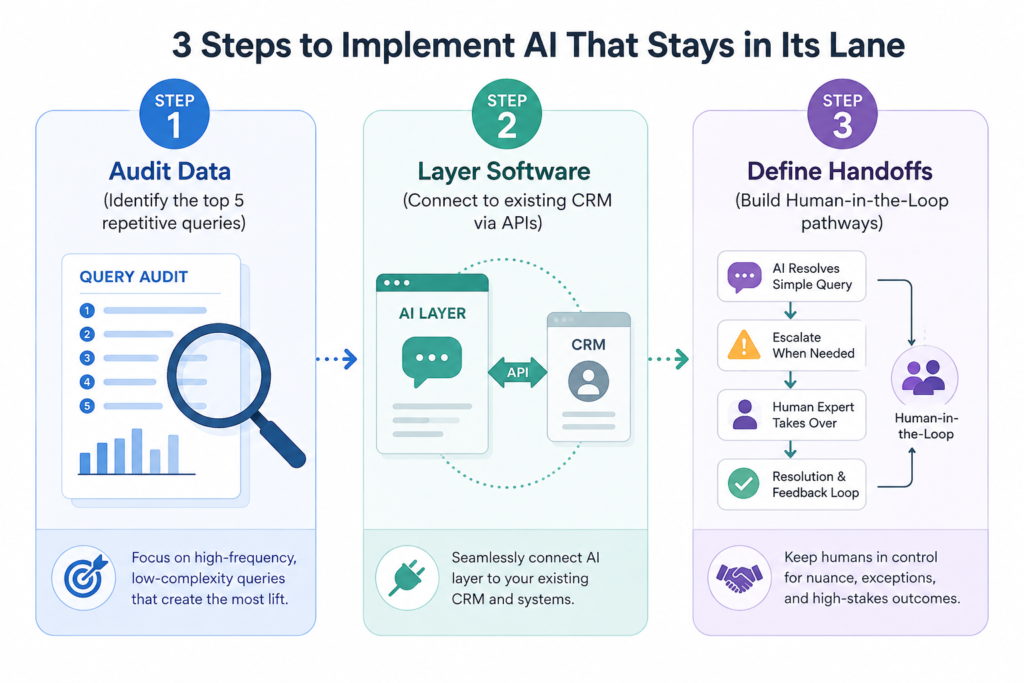
1. Audit and Isolate Top Friction Points
Review your last 90 days of call logs and categorization tags. Identify the top 5 repetitive, low-complexity queries that occupy your agents’ time. These specific interactions represent your initial target list for self-service automation.
2. Prioritize API-Driven, Low-Code Layers
Avoid solutions that require rebuilding your entire telephony stack. Look for platforms that layer cleanly over your existing CRM, ticketing software, and communication channels via secure APIs.
3. Establish a Human-in-the-Loop (HITL) Framework
Automation should never become an inescapable trap for a customer. Design clear, automated triggers to handle escalations. For instance, if a customer exhibits negative sentiment, uses frustrated language, or presents a highly non-standard issue, the system should instantly pass the interaction along with the full conversation transcript to a live human agent.
This is where next-generation platforms like AIVeda shine. AIVeda provides a seamless, unified orchestration layer that connects voice, digital chat, and complex backend workflows. Rather than forcing you to stitch together disparate point solutions, it integrates natively into your existing ecosystem. This enables enterprise operations to deploy intelligent agents that handle complex customer requests safely, securely, and completely in context.
Where Contact Center Automation Delivers Measurable ROI
ROI from automation in call center operations concentrates in a predictable set of use cases. It doesn’t spread evenly across every call type a business handles. Understanding this concentration is what separates a well-targeted call center automation rollout from one that tries to automate everything at once and delivers measurable results nowhere.
- Collections and payment recovery: Consistent, high-volume outreach where the cost of a human call often exceeds the value of the account being contacted
- Appointment scheduling and reminders: Confirmation, rescheduling, and cancellation handling without a human on every call
- Tier-1 support and FAQs: The highest-volume, most repetitive support interactions, freeing agents for complex cases
- Lead qualification and first-touch outreach: High-volume prospecting that would be cost-prohibitive to run with human SDRs alone
These are also the exact use cases where a purpose-built contact center automation solution outperforms a generic dialer with an AI label bolted on. The common thread across all four: high volume, low ambiguity, and a clear, repeatable structure to the conversation.
How to Overcome the Drawbacks of Contact Center Automation
While the upside is substantial, operations leaders must watch out for common implementation mistakes to keep performance high:
- The Over-Automation Trap: It can be tempting to automate every single interaction to minimize costs. However, complex, emotionally charged situations require a human touch. Over-indexing on automation can frustrate customers and harm long-term retention.
- Fragmented Data Silos: An automated agent is only as helpful as the data it can access. If your automated workflows cannot read and write directly to your central database or CRM in real time, they will provide generic answers that fail to resolve specific customer issues.
- Treating Automation as Static: Customer behavior, product updates, and language trends evolve constantly. Maximizing ecosystems requires ongoing tuning. Operations leaders should schedule bi-weekly reviews of containment data, unmapped intents, and customer feedback to refine prompts and optimize system logic.
Where AIveda Fits Into Contact Center Automation
AIveda’s Conversational Agent Platform, built on its private Lira LLM, is positioned squarely at Level 3 of the maturity model above. This is full conversation handling with native CRM integration, rather than a dialer with a chatbot layered on top.
Call data stays inside the enterprise’s own environment, which matters directly for the compliance question ops leaders should already be asking any vendor during evaluation.
Conclusion
Implementing call center automation is no longer a futuristic luxury. It is a fundamental requirement for modern operations leaders looking to scale efficiently. By automating predictable, repetitive tasks, you reduce operational strain, lower costs, and empower your agents to focus on the moments that matter most.
The most effective path forward is to start small: isolate your most frequent tier-1 queries, prove the value of self-service on a small scale, and expand outward. If you are ready to see how an integrated, AI-driven layer can transform your metrics without disrupting your current setup, explore the possibilities with AIVeda to start building a resilient, scalable contact center environment.
Frequently Asked Questions
1. What is the main difference between traditional IVR and modern contact center automation?
Legacy IVR relies on static button-press decision trees that force callers through rigid menus. Modern automation utilizes agentic AI and natural language processing to understand conversational speech, perform actions directly in connected databases, and resolve requests end-to-end.
2. How does automation in call center workflows preserve the human touch for sensitive interactions?
Intelligent platforms use Human-in-the-Loop (HITL) guardrails and real-time sentiment analysis. If a customer expresses frustration or presents a complex issue, the system immediately routes the caller to a live agent and hands off the complete transcript context.
3. What’s the fastest way to tell which maturity level your contact center is actually operating at?
Check whether agents still handle every live call end-to-end (Level 1), or whether automation independently resolves interactions without agent involvement in a meaningful share of cases (Level 3).
4. What metrics best measure the ROI of call center automation solutions?
Track Containment Rate (percentage of calls resolved without human intervention), drop-offs in Average Handle Time (AHT), reduction in After-Call Work (ACW) duration, and overall improvements in First Contact Resolution (FCR) and CSAT scores.
5. Is it worth automating a contact center that already has strong first call resolution rates?
Often yes. Strong FCR doesn’t mean the operation is efficient, since agents may still be spending significant time on interactions automation could resolve without their involvement at all.
6. How long does it take to implement call center automation using an API-first platform?
Because API-first platforms layer over existing CRMs and telephony systems without requiring a full infrastructure replacement, most enterprises launch initial workflows and see clear metrics improvements within 30 to 60 days.
7. How should ops leaders budget for automation if pricing models vary so widely between vendors?
Test what happens to cost specifically when call volume doubles. Usage-based, AI-native pricing should scale close to linearly; seat-based pricing often means paying proportionally more as volume grows.