
Enterprise leaders operate in a high-velocity environment where data is continuously generated across multiple touchpoints. Traditional business models rely on manual processes, legacy software, and siloed decision-making systems. These legacy frameworks create operational bottlenecks, inflate overhead, and limit scalability.
Upgrading to modern outbound call center software, integrated with high-performance call automation software, has shifted from an operational luxury to a core strategic necessity. According to research published by Gartner, over 80% of enterprise executives state that artificial intelligence and advanced automation are foundational to sustaining long-term market competitiveness and revenue growth.
Organizations that fail to modernize their core infrastructure risk falling behind agile competitors who leverage dynamic data architectures. Partnering with a dedicated technology provider allows companies to bridge the gap between raw unstructured data and real-time operational efficiency.
The Hidden Costs of Manual Outbound Outreach
Many sales teams and customer outreach operations still rely on outdated legacy phone systems or basic spreadsheets. As contact volume grows, these legacy manual setups expose severe operational vulnerabilities:
- Information Silos: Departments store critical records across isolated databases, leading to redundant manual data entry, synchronization errors, and misaligned reporting.
- Delayed Decision-Making: Relying on batch processing and periodic manual audits forces teams to react to historical outcomes rather than predicting emerging trends in real time.
- Unscalable Support & Operations: Customer service teams face excessive ticket volumes, increasing response times, burnout, and customer churn.
- Elevated Operational Overhead: Manual verification, legacy code maintenance, and inefficient system communication quietly consume significant portions of annual operational budgets.
Deploying specialized outbound calling software eliminates these bottlenecks. By pairing predictive capabilities with intelligent auto calling software, organizations replace repetitive manual tasks with continuous, high-efficiency call distribution. Explore our Cloud Transformation Services to learn how modern infrastructure mitigates legacy risks.
Core Pillars of Enterprise Outbound Calling Platforms
Modernizing your contact center infrastructure requires a structured, multi-tiered technology stack. Successfully deploying modern outbound call center software across an enterprise environment rests on three core engineering pillars:
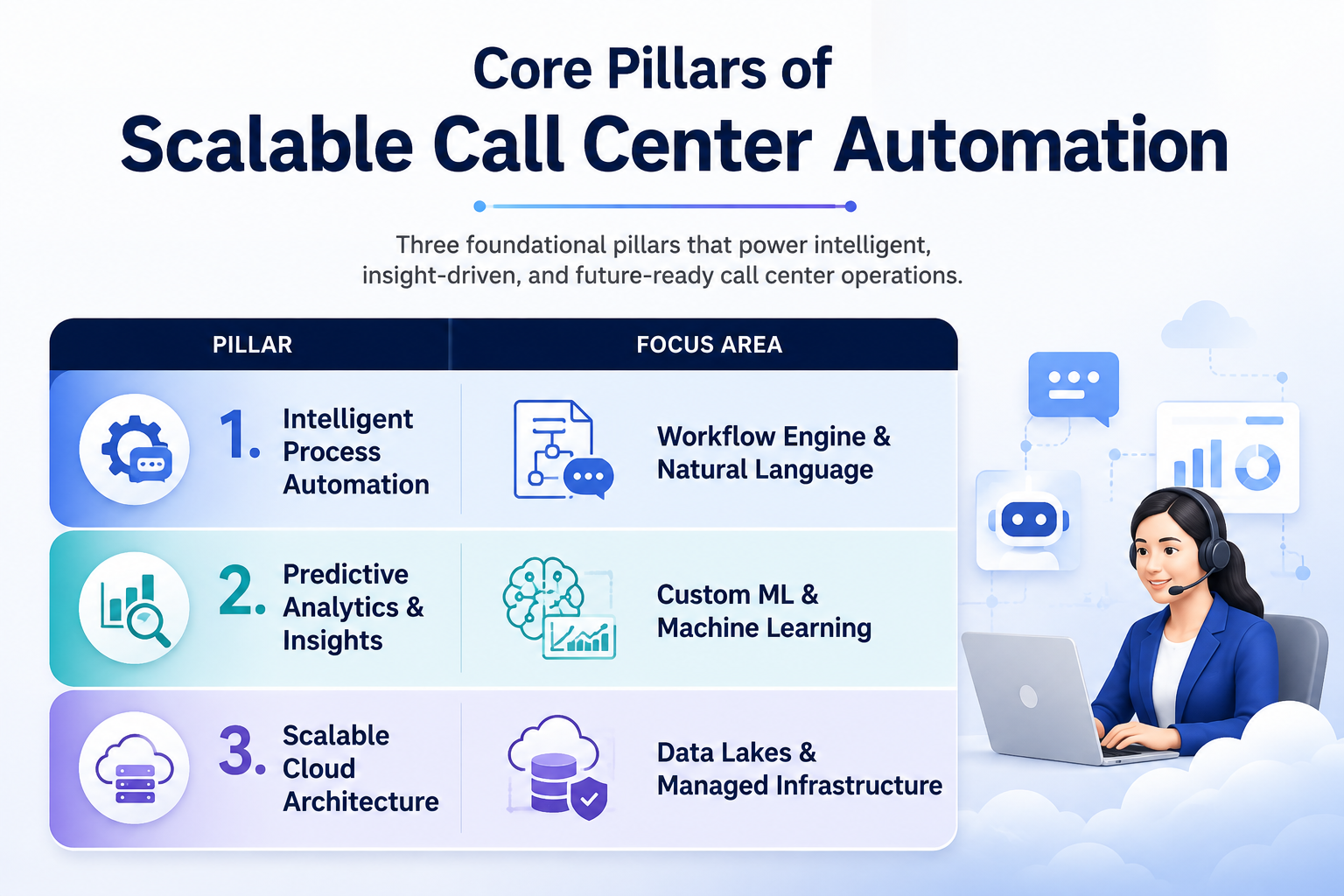
1. Intelligent Process Automation (IPA)
Standard manual dialing limits an agent to a fraction of their potential daily reach. Advanced auto calling software uses predictive and power-dialing algorithms to filter out voicemails, busy signals, and disconnected lines automatically. This ensures agents are connected only to live calls, multiplying direct talk time without expanding team size.
Learn more about automated workflows via our Intelligent Automation Solutions.
2. Predictive Analytics and Custom Machine Learning
Beyond simply placing phone calls, comprehensive call automation software orchestrates the entire lifecycle of a customer interaction. This includes automatic pre-call context delivery to agent screens, instant post-call summary generation, real-time sentiment tracking, and automated CRM record updates immediately after a call ends.
3. Scalable Data Infrastructure and Unified Cloud Orchestration
High-volume outreach systems require robust cloud infrastructure capable of handling thousands of concurrent connections with low latency and crystal-clear voice quality. Modern outbound calling software integrates directly into cloud data pipelines, ensuring compliance with local call governance standards while providing real-time supervisor analytics dashboards.
Proven Case Studies from Aiveda Partnerships
Authentic enterprise transformation requires proven strategies and measurable outcomes. At Aiveda, our client engagements combine domain expertise with robust engineering standards. Below are examples of how tailored implementations deliver verified, high-impact results across various industries.
Case Study 1: Transforming Financial Risk Assessment & Loan Approvals
- The Challenge: A regional banking institution faced severe operational delays due to manual loan processing workflows. Credit evaluations took an average of 4 business days, resulting in high drop-off rates and rising administrative costs.
- The Solution: Aiveda designed and deployed an end-to-end automated risk evaluation architecture integrated directly with the bank’s core legacy database. The platform uses custom machine learning models trained on millions of historical compliance records to verify identity, analyze credit risk, and detect fraud signals instantly.
- The Result: Loan application processing times dropped from 4 days to 12 minutes, operating overhead decreased by 45%, and credit assessment precision improved significantly. Explore the complete technical approach on our Private AI Infrastructure for Enterprise page.
Case Study 2: Cloud Financial Optimization & Cost Governance
- The Challenge: Quantum Financials faced escalating cloud infrastructure costs and low spending visibility across distributed cloud environments, creating significant budget overruns and operational inefficiency.
- The Solution: Aiveda implemented specialized FinOps solutions, deploying real-time cost monitoring tools alongside custom machine learning algorithms for predictive budget forecasting and automated resource auto-scaling scripts.
- The Result: Within the first quarter post-implementation, the client achieved a 40% cloud spending reduction, a 30% improvement in resource utilization, and a 25% increase in cloud ROI. Read the full story on our Quantum Financials Case Study page.
Step-by-Step Implementation Roadmap for Modern Enterprises
Upgrading to enterprise-grade outbound call center software requires methodical planning to preserve data integrity, protect sensitive client information, and prevent service downtime.
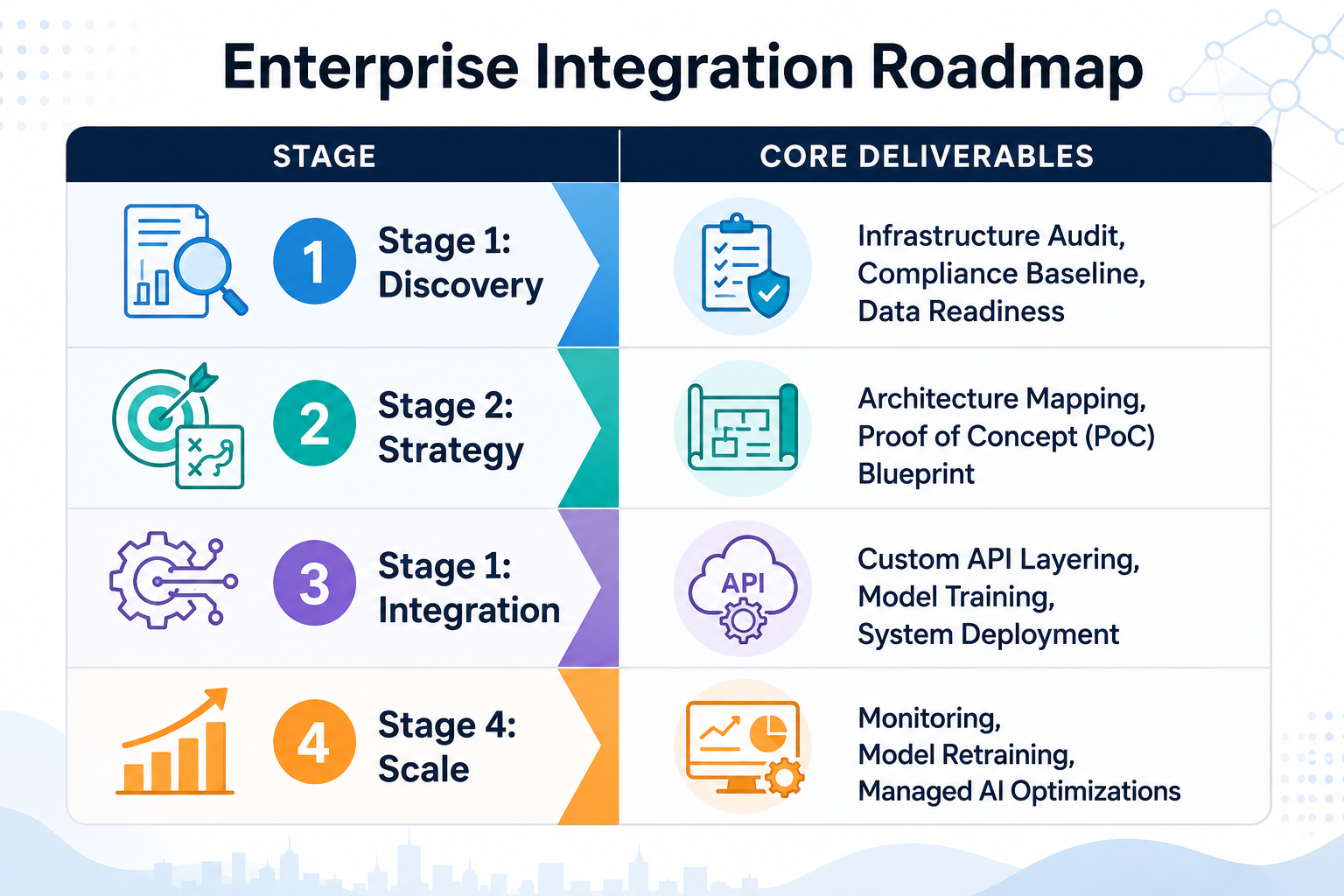
Stage 1: Strategic Discovery and Data Audit
The integration process starts with a technical review of existing systems, data pipelines, compliance boundaries, and security protocols. Our team identifies operational friction points, removes duplicate data records, and establishes performance baselines to measure future success.
Stage 2: Architecture Blueprinting and PoC Development
Before deploying across the entire workforce, engineers design custom API connectors and configure initial outbound calling software settings. A controlled pilot phase tests network latency, predictive dialing accuracy, and answering machine detection in a secure staging environment.
Stage 3: System Integration and Custom Model Training
Once validated, the platform is integrated directly into active sales pipelines and CRM platforms using lightweight middleware. Intelligent call automation software scripts are configured to trigger automatically based on prospect actions, ensuring immediate lead response without manual agent intervention.
Stage 4: Production Rollout, Monitoring, and Iterative Scaling
Following successful staging tests, system access is expanded across functional units. Continuous monitoring systems track performance metrics, API speeds, and model reliability. Regular retraining cycles ensure algorithms adapt smoothly to shifting market conditions and customer behaviors. Learn how our Managed Infrastructure Engineering simplifies system maintenance.
Conclusion
Modernizing outreach operations with state-of-the-art outbound call center software, intelligent auto calling software, and scalable call automation software is essential for driving consistent pipeline growth. By moving beyond manual dialing and fragmented databases, enterprise teams eliminate operational bottlenecks, dramatically increase agent talk time, and maximize contact rates. As demonstrated across our client success stories, implementing modern, automated infrastructure turns high-volume client communication into a durable competitive advantage.

Frequently Asked Questions
How does modern outbound call center software handle TCPA and regulatory compliance?
Modern platforms incorporate built-in compliance modules that automatically scrub calling lists against Do-Not-Call (DNC) registries, enforce local calling time windows, and manage opt-out requests instantly. This protects enterprises from compliance violations while maintaining high outreach volume.
Can auto calling software integrate with our existing CRM and ERP tools?
Yes. Enterprise-grade auto calling software uses robust API gateways and microservices that connect directly to major CRM systems (such as Salesforce, HubSpot, or custom proprietary databases). This enables bi-directional data syncing, keeping contact records updated in real time without manual data entry.
What is the difference between basic outbound tools and full call automation software?
Basic tools simply dial phone numbers from a list. Advanced call automation software manages the entire end-to-end communication workflow including automated lead distribution, interactive voice response (IVR) surveys, instant CRM record logging, automated SMS follow-ups, and real-time speech analytics.
What is the typical deployment timeline for enterprise outbound calling software?
A standard implementation timeline ranges from 6 to 12 weeks, depending on call volume, legacy telephony complexity, and custom integration needs. Telephony auditing and pilot setup take 2 to 3 weeks, with full CRM integration, automated workflow routing, and agent training concluding shortly after.
How does AIVeda ensure long-term platform stability and high uptime post-launch?
We provide continuous, post-deployment support packages including 24/7 infrastructure monitoring, voice quality optimization, security updates, and dedicated engineering support to ensure uninterrupted communication flows.