A dental patient books six weeks out and forgets by the time the date arrives. A borrower misses a loan-review call because nobody reminded her it was today. A D2C customer never gets the setup call they were promised, so the product sits in a drawer until the subscription lapses. Three different industries, one identical failure: a reminder that should have gone out didn’t.
That failure is expensive, and it’s measurable. A 2026 systematic review and meta-analysis of ten randomized controlled trials found that appointment reminders increase attendance by 11% on average, with telephone reminders performing on par with SMS across the pooled data a meaningful, evidence-backed number, not a vendor’s marketing claim. The catch is that reminders only work if they go out consistently, and consistency is exactly what breaks down once appointment volume outgrows what one or two staff members can manage by hand.
Automated appointment reminder calls solve that problem and not by replacing the human relationship, but by removing the administrative layer that gets in the way of it. This piece covers how the technology actually works, where it delivers the clearest return by industry, and what to look for in a platform before you deploy.
The Real Cost of a Reminder That Doesn’t Go Out
Most businesses start with manual reminder calls because it feels controllable. A team member works the list, logs responses, flags cancellations. It works until appointment volume outgrows what one or two people can cover in a morning. That’s when the cracks appear: calls skipped during busy periods, response logs updated hours late, a 9 AM cancellation that doesn’t get back-filled until noon, if at all.
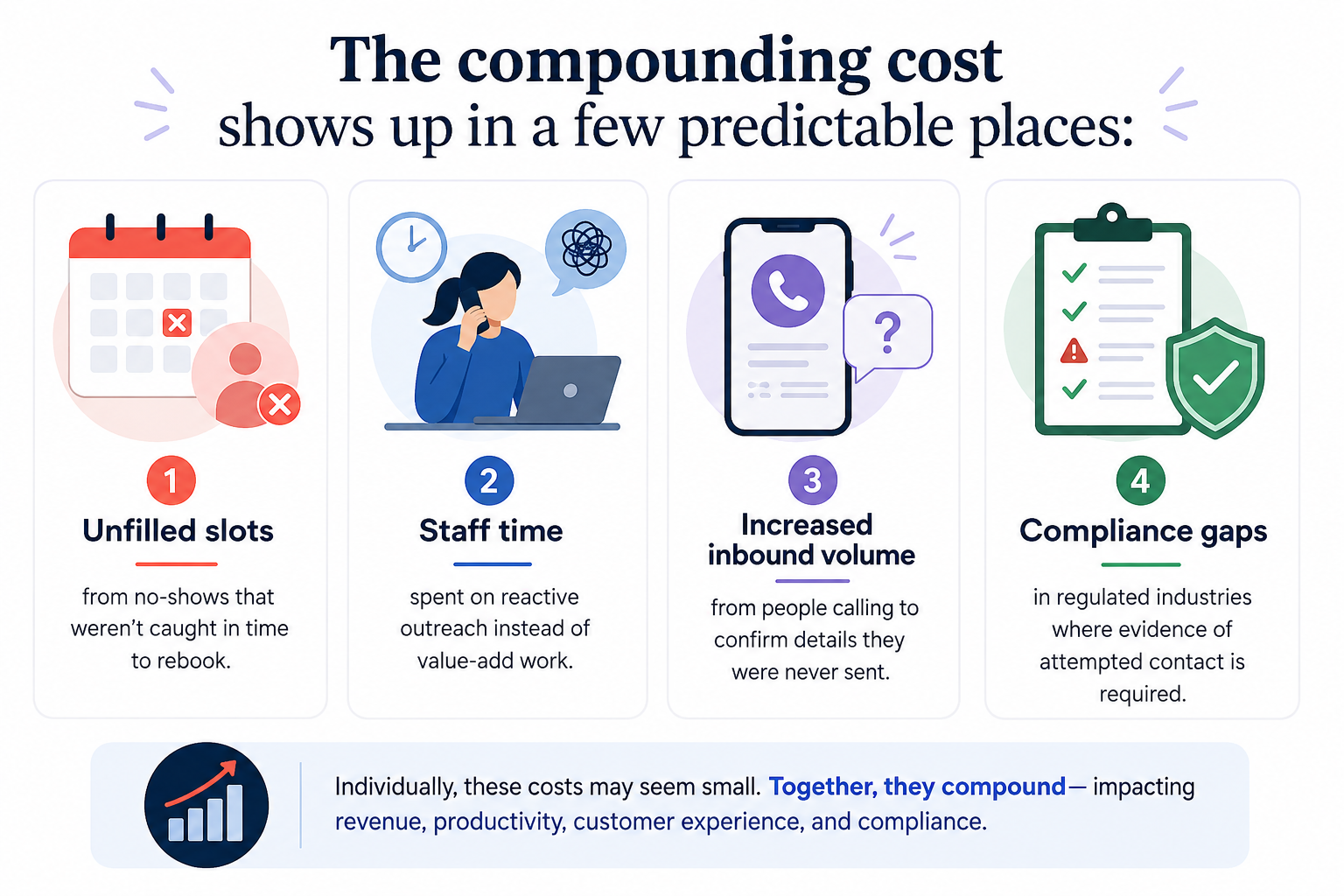
At a certain scale, manual reminder processes stop being a minor inefficiency and start acting as a hard ceiling on how many appointments a business can actually manage. This is precisely the ceiling automated appointment reminder calls remove not by working harder than a manual process, but by removing the volume constraint entirely.
How Automated Appointment Reminder Calls Actually Work
| Step | What Happens |
|---|---|
| Booking confirmed | The appointment is logged in the CRM, scheduling system, or core platform |
| Reminder triggered | The system fires the outbound call at a pre-set interval 48 hours out, 24 hours out, same morning |
| Caller responds | The AI handles the response in real time: confirmation, cancellation, reschedule, or “call me later” |
| CRM updated | The outcome is logged automatically, and any open slot is flagged for rebooking or waitlist fill |
| Escalation if needed | Calls requiring judgment disputes, special requests, complex reschedules route to a human with full context |
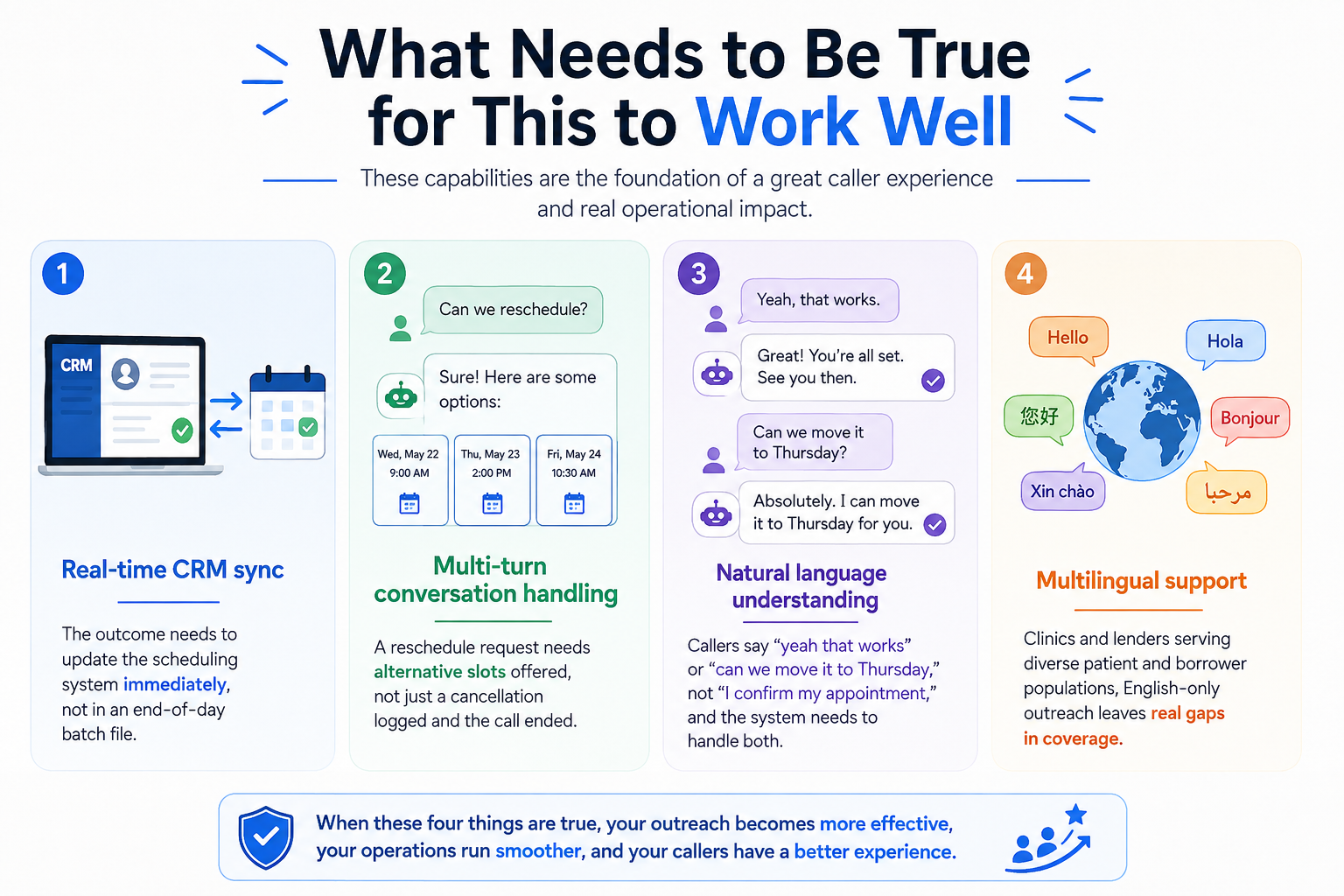
The difference between a generic robocall and a real automated reminder system lives entirely in step 3. A robocall plays a message and hangs up regardless of what happens next. A conversational AI agent helps your conversational system actually listen to what the caller says and handles the response. It is what makes confirmation, cancellation, and rescheduling manageable without a human on every call.
Appointment Reminder Calls by Industry
Three industries, three different stakes, one shared logistics problem. Here’s how the use case actually differs:
| Industry | What’s Being Confirmed | What Breaks Without Automation |
|---|---|---|
| Clinics | Appointments, prep instructions, follow-on bookings | Unbillable no-show slots, lost rebooking revenue |
| BFSI-adjacent lenders | Loan reviews, document collection, EMI counseling | Delayed files, compliance gaps in contact evidence |
| D2C brands | Post-purchase consultations, renewal check-ins | Lower reorder rates, missed upsell windows |
Clinics: Protecting Slot Utilization and Patient Continuity
For healthcare providers, primary care, dental, specialty, or diagnostics reminder systems are directly tied to revenue. A no-show is almost always an unbillable slot, and a last-minute cancellation without adequate notice means a waiting-list patient who could have been served wasn’t. The use case here goes beyond a simple “don’t forget”: it includes confirming prep requirements (fasting instructions, referrals, arrival time), handling rescheduling requests with real alternatives, and following up post-appointment to schedule the next booking in the care cycle. Clinics running this manually above roughly 30–50 appointments a day are typically leaving rebooking revenue on the table.
BFSI-Adjacent Lenders: Keeping Borrower Meetings on Track
For NBFCs, fintech lenders, loan-against-property providers, and mid-market credit businesses, the appointment in question is usually a loan review, document collection call, EMI counseling session, or disbursement discussion. The higher stakes than a routine check-in, but the same logistical failure mode: a missed call means a delayed file and a servicing team chasing a rescheduled interaction. Automated reminders for BFSI-adjacent lenders also serve a compliance function directly, since regulators often expect documented evidence of attempted contact before a matter escalates. A complete call log with CRM timestamps provides exactly that, generated automatically rather than added to someone’s manual task list.
D2C: Turning Post-Purchase Touchpoints Into Retention Moments
For D2C brands selling high-consideration products skincare, supplements, fitness equipment, health tech- post-purchase consultation calls are an increasingly common retention lever. A customer who gets a setup call or usage check-in reorders at meaningfully higher rates than one left to figure things out alone. The appointment here is often softer, a recommended check-in rather than a hard booking, so automated reminders serve two jobs at once: converting a soft suggestion into a confirmed slot, and reducing no-shows on calls that directly feed renewal and upsell conversations. The same infrastructure typically extends to delivery confirmation calls, subscription renewal reminders, and waitlist notifications.
Choosing the Right Platform for Automated Appointment Reminder Calls
Five questions filter out most of the noise before you sign with a vendor or attempt to build this in-house:
- Does it integrate with your existing CRM or scheduling platform without a full rebuild?
- Can it handle multi-turn conversations not just confirmation, but rescheduling, cancellation, and waitlist fill?
- Does it support the languages your patients, borrowers, or customers actually use?
- Where is call data stored and processed inside your environment, or through a third-party model?
- What does the compliance audit trail actually look like can you pull a full call log on demand?
If those questions read like a useful filter, AIveda’s Lira LLM is designed to answer. Lira runs automated appointment reminder calls with adaptive context management, meaning it holds the conversation through confirmation, rescheduling, and cancellation handling without losing the thread. For healthcare providers, it manages patient-facing conversations in multiple languages with prep-instruction and rebooking logic built into the call flow.
For BFSI-adjacent lending workflows, it handles borrower outreach inside the enterprise’s own private environment call data stays on-prem rather than routing through a shared public model, which matters for compliance-sensitive teams. For D2C brands, it integrates with existing CRM and order-management systems to trigger the right call at the right moment in the post-purchase journey.
For a broader look at how conversational AI systems like this are typically architected across use cases, AIveda’s guide on voice bots for call centers covers eight real call-flow examples worth reviewing before scoping a deployment.
Conclusion
Reminder calls are a logistics problem, not a relationship problem and a solvable one at that. The research backs this up directly: a 2026 meta-analysis of ten clinical trials found reminders measurably improve attendance, and that effect only compounds when reminders go out consistently instead of falling apart under volume.
For clinics, BFSI-adjacent lenders, and D2C brands alike, the cost of inconsistent outreach unfilled slots, delayed files, missed renewals adds up faster than most operations teams realize. Automated appointment reminder calls, built on a proper conversational AI layer, don’t just cut no-shows. They hand staff time back and leave a compliance-ready record of every attempted contact along the way.
Frequently Asked Questions
How much does an unfilled appointment slot actually cost a growing clinic over a year, not just per visit?
It compounds quickly. A handful of daily no-shows adds up across a full schedule year, and the loss isn’t just the missed visit. It’s the follow-on bookings and referrals that slot would have generated downstream.
Why do BFSI-adjacent lenders specifically need a compliance audit trail for reminder calls, not just confirmation?
Regulators often require documented evidence of attempted contact before certain collections or servicing actions can proceed. A timestamped call log generated automatically satisfies that requirement without adding manual documentation work.
Can a D2C brand use the same reminder infrastructure for something that isn’t a formal appointment, like a renewal check-in?
Yes, the same call-and-response logic that handles a confirmed booking works just as well for softer touchpoints like subscription renewals, delivery windows, or waitlist notifications, since the underlying conversation pattern is identical.
What actually separates a “multilingual” reminder platform from one that just translates a script?
A genuinely multilingual system understands and responds naturally in the caller’s language throughout the conversation. A translated script still breaks down the moment a caller responds in a way the system wasn’t scripted to expect.
Does automating reminder calls reduce staff headcount, or just shift what staff spend time on?
Usually the latter, and that’s the more valuable outcome. Front-desk and servicing staff stop spending hours on repetitive outbound calls and start spending that time on complex cases that actually need human judgment.
How is call data handled differently for a BFSI lender versus a clinic using the same platform?
Both require data to stay within a controlled environment, but lenders typically need stricter on-prem or private-model handling given regulatory scrutiny, while clinics need HIPAA-aligned handling of patient health information specifically.