

PPE detection is computer vision that watches your existing CCTV feeds and flags, within seconds, anyone in a marked zone who is missing a required item such as a helmet, safety vest, gloves or goggles. It runs on an edge server at the site, sends the supervisor an alert with a snapshot, and logs every event for audits.
The case for it starts with the numbers. The International Labour Organization estimates that nearly three million workers die every year from work-related accidents and diseases, and 395 million suffer non-fatal injuries at work, with Asia and the Pacific accounting for 63% of the deaths. In India, factory data from the Directorate General Factory Advice Service and Labour Institutes, obtained by IndiaSpend, showed that three people died and eleven were injured every day, on average, in registered factories between 2017 and 2020.
PPE is the last line of defence in that picture, and it only works when it is worn. This guide explains how AI PPE detection works on a real factory floor, what it detects reliably and what it does not, what accuracy to expect, how to handle privacy under the DPDP Act, and how to pilot it on a few cameras before you commit.
Why PPE compliance needs more than a safety officer
A safety officer cannot watch forty camera feeds, and spot checks see a few minutes of an eight-hour shift. Lapses cluster where nobody is looking: the night shift, the short walk across a forklift lane, the hot afternoon when goggles fog up. Even in mature regimes, PPE rules are among the most frequently broken. In the United States, respiratory protection (1,953 violations) and eye and face protection (1,665 violations) were both in OSHA’s ten most frequently cited standards for fiscal 2025.
The regulatory ground in India has also moved. The Occupational Safety, Health and Working Conditions Code, 2020, which consolidates thirteen earlier laws including the Factories Act, came into force on 21 November 2025. The employer’s duty to provide a safe workplace is not new, but the evidence that it is being met matters more when every incident is examined against a single consolidated code.
Automated detection changes what a safety team can see. Every lapse is captured with a time, a camera, a zone and a shift, which turns PPE from a matter of policing individuals into a matter of fixing patterns: the entry point with no helmet rack, the line where gloves get removed because they slow the work, the contractor crew that was never briefed.
How AI PPE detection works, step by step
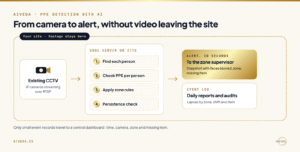
- Camera streams: Existing IP cameras send their video to a server on the site over the standard RTSP protocol.
- Frame sampling: PPE does not change in a fraction of a second, so the system analyses a few frames per second rather than every frame, which keeps the hardware small.
- Person detection: A vision model finds each person in the frame.
- PPE detection per person: A second step checks each person for the items that matter: head, torso, hands, eyes and face.
- Zone rules: Requirements differ by area. A helmet may be required on the shop floor, goggles only at the grinding bay, and nothing at all in the canteen. Each camera view is divided into zones with their own rules.
- Persistence check: To avoid alerts for someone adjusting a helmet, the system raises an alert only when an item is missing for longer than a set time.
- Alert: The supervisor for that zone receives a snapshot, the zone and the missing item, on a dashboard or as a message to their phone.
- Log: Every event is recorded for daily reports, trend analysis and audits.
Steps five and six are where most of the practical value lies. A model that detects a missing helmet perfectly is useless if it alerts on people in the office corridor or fires twenty times a minute. The rules layer is what makes the output something a supervisor can act on.
What AI can detect reliably, and what is harder
Not all PPE is equally visible to a camera mounted four metres up. Large, distinctively shaped items in contrasting colours are easy; small items close to the face or hands, or items hidden by posture, are hard. The table below is a qualitative guide; your own footage decides the real numbers.
| Item | How reliably cameras see it | What helps |
|---|---|---|
| Hard hat | High: large, distinct shape and colour | Cameras that see heads from the front or side, not straight down |
| High-visibility vest | High in good light | Training on your vest colours; infrared night footage loses colour |
| Gloves | Medium: small and often hidden by the work | Closer cameras at workstations |
| Safety glasses and goggles | Low to medium at CCTV distance | A dedicated camera at entry points to the zone |
| Masks and respirators | Medium | Face-level angles; checking at the zone entry |
| Safety shoes | Low: feet are often out of view | Checks at gates and turnstiles |
| Harness at height | Medium, depends on the scene | Cameras dedicated to work-at-height areas |
The practical conclusion is to design coverage around the items, not the other way round. Use the cameras you already have for helmets and vests across the floor, and add a small number of close cameras at the entries to zones that require eye, face or hand protection.
How accurate is AI PPE detection?
Public benchmarks give a useful sense of the difficulty. SH17, a dataset built for PPE detection in manufacturing, contains 8,099 annotated images with 75,994 instances across 17 classes; the best model tested reached 70.9% mean average precision on PPE detection. That figure is averaged across varied public images, small items and difficult classes. It is a reminder that a generic model downloaded from the internet is a starting point, not a deployment.
Accuracy on your site depends on your cameras, lighting, uniforms and layout, and it usually improves once the model is tuned on your own footage. Measure it the way your supervisors will experience it:
- Precision per item: of the alerts raised, how many were real lapses.
- Recall per item: of the real lapses, how many were caught. Measure this on a sample of footage reviewed by a person.
- Alerts per camera per shift: the number your supervisors can realistically act on.
Agree targets for all three before you start, and accept different targets for different items. A helmet rule can be held to a high bar; a goggles rule at CCTV distance may only be practical at a zone entry camera.
Vision AI at the edge: cameras that inspect, count and flag safety issues in real time, on site, with your footage staying inside your environment.
Cameras, edge servers and your existing CCTV
Most sites can start with the cameras they already have. Modern IP cameras that stream over RTSP can feed a PPE detection system directly, and the main question is whether their angles and resolution show the items you care about. Run a short check before buying anything: pull footage from each candidate camera at different times of day and confirm that a person can see the helmet, vest or gloves clearly. If a person cannot, the model will not either.
Where the analysis runs matters for cost, speed and privacy. Running it on an edge server at the site keeps video off the network, keeps alert times short and means footage never leaves the plant. A central dashboard can still show events from every site, because only small event records travel, not video. This is how we built LIRA Vision: vision AI that runs at the edge, on site, inside the customer’s environment.
Plan the integrations early. Alerts need to reach the person who can act within the shift, which usually means routing by zone. Daily summaries belong in the safety team’s existing reporting, and serious repeated events may need to reach a permit-to-work or EHS system. For plants connecting vision to production data as well, our page on private AI for manufacturing covers the wider picture, and the earlier guide to on-premise AI with MES and ERP covers the system side.
Privacy and the DPDP Act: design it in
CCTV footage of identifiable people is personal data, so a PPE detection system is a personal data processing system. The Digital Personal Data Protection Act, 2023 allows processing without consent for certain legitimate uses, including “the purposes of employment or those related to safeguarding the employer from loss or liability” under section 7(i). Workplace safety monitoring of your own staff will often fall within that, but contractors and visitors need thought, and the other duties apply regardless of the lawful basis.
Those duties are concrete. Rule 6 of the DPDP Rules requires security safeguards including encryption, access control, and logs kept for one year, and a breach must be reported to the Data Protection Board within 72 hours. Most of these obligations apply in full from 13 May 2027. Good design makes them easy to meet:
- Process video on site and store events, not continuous footage.
- Blur faces in alert snapshots unless identification is genuinely needed.
- Do not add face recognition to a PPE system by default; it changes the purpose and the risk.
- Limit who can view snapshots, and keep a log of who did.
- Set a short retention period for snapshots and delete on schedule.
- Tell workers what is monitored, why, and how the data is used; post notices for visitors.
Our DPDP compliance checklist for AI systems covers these duties in detail. This section is practical guidance, not legal advice.
Rolling it out: a four-week pilot on a few cameras
The fastest way to know whether PPE detection works on your site is to run it on two to four cameras for four weeks, with one metric agreed in advance.
- Week 1: choose the cameras and zones, define the PPE required in each zone, agree precision and recall targets and an alert budget per shift, and measure the current lapse rate on a reviewed sample of footage.
- Week 2: run the system on live feeds, with alerts going to one supervisor.
- Week 3: tune the model on your footage, adjust zones and persistence times, and measure against the targets.
- Week 4: decide, with the measured accuracy, the alert volume, the hardware needed per site and the cost to run, plus a rollout order for the remaining cameras.
Involve the safety officer and one shift supervisor from the first day. They know which zones matter, which items are routinely skipped and which alerts they will actually act on, and their judgement is what decides whether the targets are realistic. Our four-week AI proof of concept playbook explains how to set the metric and write the decision memo.
Questions to ask any PPE detection vendor
Three kinds of product sell under the PPE detection label, and each can be the right choice:
| Type | Examples | Where video is processed | Best when |
|---|---|---|---|
| Camera-maker analytics | Hikvision, Dahua | In their cameras and recorders | You are buying new cameras from one maker and need standard checks |
| Specialist safety platforms | Intenseye, Protex AI, Voxel | On edge devices at your site, with events and clips sent to the vendor’s cloud platform | You want a ready safety dashboard covering many use cases, run as a service |
| Private deployment | AIVeda (LIRA Vision) | On an edge server at your site, inside your environment | Footage must stay inside your environment and rules need tailoring to your zones and systems |
These questions separate them:
- Does it work with the cameras we already have, or does it need new ones?
- Is video processed on site, or sent to the cloud? What leaves the site?
- What precision and recall does it achieve on our footage, for each item, after tuning?
- How are false alerts reviewed, and how do corrections improve the model?
- Where do alerts go, how fast, and can they be routed by zone and shift?
- What is stored, for how long, and who can see it?
- Are faces blurred, and is face recognition switched off by default?
- How is it priced: per camera, per site or per event?
- Who owns the model tuned on our footage?
Frequently asked questions
What is PPE detection?
PPE detection is the use of computer vision on camera feeds to check whether people in a work area are wearing the personal protective equipment that area requires, such as helmets, vests, gloves or goggles, and to alert a supervisor when an item is missing.
Can PPE detection use our existing CCTV cameras?
Usually, yes. IP cameras that stream over RTSP can feed a detection system directly. Check each camera’s angle and resolution first: if a person reviewing the footage cannot clearly see the item, the model will not either. Small items such as goggles often need a closer camera at the zone entry.
How accurate is AI PPE detection?
It varies by item and site. On the public SH17 manufacturing dataset, the best model reached 70.9% mean average precision across 17 classes. Large items such as helmets and vests are generally detected more reliably than goggles or gloves, and tuning on your own footage usually improves results.
Does PPE detection need worker consent under the DPDP Act?
Not always. Section 7(i) of the DPDP Act allows processing for purposes of employment without consent, which often covers safety monitoring of staff. Security safeguards, retention limits and breach reporting still apply, and contractors and visitors need separate consideration. Confirm your position with counsel.
Does PPE detection identify individual workers?
It does not need to. A well-designed system detects missing items, not identities, and can blur faces in alerts. Adding face recognition changes the purpose and the privacy risk, so it should be a deliberate decision, not a default.
Can PPE detection run without sending video to the cloud?
Yes. Running detection on an edge server at the site keeps all video on premises. Only small event records, such as the time, zone and missing item, need to travel to a central dashboard.
Pilot PPE detection on two cameras
Four weeks, your own footage, agreed accuracy targets and a written go / no-go at the end. You keep everything we build.